1. Study what an ALT tag is.
2. Use KompoZer to edit the following homepage
at http://bloggercamp.blogspot.com/2007/01/2007.html
You can copy and paste the content to your KompoZer.
3. Save your editings and preview your webpage using Firefox
4. Make the webpage accessible by
adding ALT text to the images.
5. Go to the Firefox Add-ons site for Firefox Accessibility Extension
6. Click the "Install now" button on the add-ons website
7. Check whether you can see the ALT text for the images by selecting the "Show Text Equivalent" function.
2010年10月18日 星期一
Lab 20
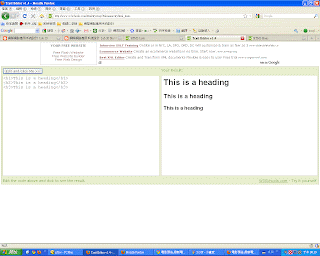
Headings
1. Copy and paste the Headings example athttp://www.w3schools.com/html/html_primary.asp
2. Enter http://www.w3schools.com/html/tryit.asp?filename=tryhtml_basic
3. What kind of effects can you see?
Lists
4. Copy and paste the Headings example athttp://www.w3schools.com/html/html_lists.asp
5. Enter http://www.w3schools.com/html/tryit.asp?filename=tryhtml_basic
6. What kind of effects can you see?
1. Copy and paste the Headings example athttp://www.w3schools.com/html/html_primary.asp
2. Enter http://www.w3schools.com/html/tryit.asp?filename=tryhtml_basic
3. What kind of effects can you see?
Lists
4. Copy and paste the Headings example athttp://www.w3schools.com/html/html_lists.asp
5. Enter http://www.w3schools.com/html/tryit.asp?filename=tryhtml_basic
6. What kind of effects can you see?
| <h1><h2><h3>讓字體依照順序越來越小 |
| </li>使標題有條列式的圓點出現 |
Lab 19
Preparation
1. Using Microsoft Notepad, Copy and paste the HTML example at Introduction to HTML
2. Save the file as myfile.html
3. Open the file using Firefox.
New editor
4. Enter http://www.w3schools.com/html/tryit.asp?filename=tryhtml_basic
5. Copy and paste the HTML example at Introduction to HTML
6. Verify your results on the screen.
1. Using Microsoft Notepad, Copy and paste the HTML example at Introduction to HTML
2. Save the file as myfile.html
3. Open the file using Firefox.
New editor
4. Enter http://www.w3schools.com/html/tryit.asp?filename=tryhtml_basic
5. Copy and paste the HTML example at Introduction to HTML
6. Verify your results on the screen.
Lab 18
Install Google Browser Google Chrome and Firefox 3.0, try a few websites and compare their performance. For example, youtube, blogspot, msn, and yahoo.
Google Chrome
1.選單列隱藏在左邊功能鍵裡,有較大的瀏覽網頁檢視面
2.有內建Adobe Flash Player
3.外觀簡單不失風趣
Firefox
1.有出很多套件可以輔助使用上的不足
2.右下角會有讀取網頁的進度的顯示
3.原本的功能強大也較類似IE
Google Chrome
1.選單列隱藏在左邊功能鍵裡,有較大的瀏覽網頁檢視面
2.有內建Adobe Flash Player
3.外觀簡單不失風趣
Firefox
1.有出很多套件可以輔助使用上的不足
2.右下角會有讀取網頁的進度的顯示
3.原本的功能強大也較類似IE
Homework 5
1. 網路可不可能增進身心障礙者的便利,請舉例說明?
Ans:可以
網路對身心障礙者來說是以按鍵操控比起其他活動簡單得多的工具,可以透過按鍵浮印簡單的找到如何操控,各大政府網站都有針對身心障礙者所設計的幫助工具。而且透過類似網拍,可以不用上街,在家就能買東西,也便利了身心障礙者。
2. 瀏覽器會洩漏使用者的隱私嗎? 為甚麼?
Ans:單然會
1.在網咖或者公共電腦有可能被有心人士安裝鍵盤紀錄程式,造成你的密碼被別人 複製下來。
2.瀏覽器的Cookies,可能會有帳號等隱私資料被儲存在裡面,有可能被盜用。
Ans:可以
網路對身心障礙者來說是以按鍵操控比起其他活動簡單得多的工具,可以透過按鍵浮印簡單的找到如何操控,各大政府網站都有針對身心障礙者所設計的幫助工具。而且透過類似網拍,可以不用上街,在家就能買東西,也便利了身心障礙者。
2. 瀏覽器會洩漏使用者的隱私嗎? 為甚麼?
Ans:單然會
1.在網咖或者公共電腦有可能被有心人士安裝鍵盤紀錄程式,造成你的密碼被別人 複製下來。
2.瀏覽器的Cookies,可能會有帳號等隱私資料被儲存在裡面,有可能被盜用。
2010年10月11日 星期一
Lab 17
AccessBar: displays defined accesskeys in a fixed-position bar along the bottom of the window. Added 2005-04-01 (not a joke). Find how many access keys have been defined at
www.ocac.gov.tw www.epa.gov.tw
Continued from the above, use google to find 3 more government sites in Taiwan that enable access keys.
www.ocac.gov.tw www.epa.gov.tw
Continued from the above, use google to find 3 more government sites in Taiwan that enable access keys.
Lab 16
- Google Search Keys Numbers the results in a Google search page and you can type the corresponding number to follow the link. Updated: 2005-04-26. more
- Google Access Keys Enables navigation through Google search results.
http://dia.z6i.org/ (中文)
訂閱:
文章 (Atom)